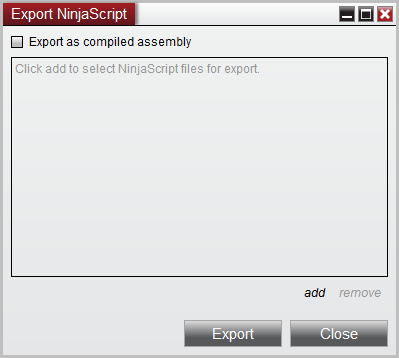
Create a NinjaScript ZIP from the NinjaTrader Control Center inside your Ninja Mobile Trader VPS. Select the scripts you intend to package, choose editable source or a compiled assembly, and review the resulting archive before sharing it.
We specialize in hosting NinjaTrader Desktop on Windows. Your scripts and development workspace stay in one installation you can reach across supported devices, with Windows licensing included and 24/7 VPS support.
The official NinjaTrader image above shows the export dialog before files are selected. It illustrates the controls, not a completed package.
Decide what the package should contain#
Write a short inventory: script names, version, required libraries and intended recipient. Export only code you own or have permission to redistribute. A purchased add-on’s installation does not establish permission to repackage it; use the vendor’s authorized download and licensing process.
This task packages selected NinjaScript. For a broader recovery copy of your NinjaTrader environment, follow our backup and restore guide. For an editable Strategy Builder project, also preserve the working copy described in our Strategy Builder guide.
Choose source or compiled format#
NinjaTrader’s export reference distinguishes two formats:
| Intended use | Export choice |
|---|---|
| Let the recipient inspect and edit the scripts | Source files |
| Distribute a compiled library instead of editable source files | Export as compiled assembly |
Keep your own editable source separately when distributing a compiled package. A DLL is not your working source archive, and compilation alone should not be treated as an absolute secrecy guarantee.
Create the ZIP in the hosted desktop#
- In Control Center, open Tools → Export → NinjaScript.
- For a compiled package, enable Export as compiled assembly. Leave it unchecked for source files.
- Click add, choose the relevant Type, select the intended files and confirm with OK.
- Review the complete file list. For an assembly, optionally fill in Product and Version.
- Select Export, then choose the ZIP filename and save location.
The documented default folder is Documents\NinjaTrader 8\bin\Custom\ExportNinjaScript. Record the actual path you choose: this save dialog belongs to the Windows VPS, so a similarly named folder on your connecting device is a different location.
If compilation prevents export, use our NinjaScript compile-error guide to identify the failing file before retrying. Do not remove unrelated scripts just to obtain a ZIP.
Check dependencies before handing it over#
A package that relies on another library needs that dependency handled deliberately. NinjaTrader’s distribution procedure describes packaging custom assemblies, native DLLs and optional templates. Follow those rules for your package; do not copy the entire Custom folder or assume every installed component belongs in the export.
Resource files also need attention. NinjaTrader’s compiled-assembly guidance explains limitations around embedding additional files and warns that exports may not work with older NinjaTrader versions. Record the platform version used to build the package and any required resources.
Verify the result and retain the working copy#
Before sharing, inspect the archive’s file list against your inventory. Check source and configuration files for passwords, API keys or other private values. Remove secrets from the working files and create a fresh export if needed; deleting one visible file is not a review of the remaining contents.
Use a separate, non-live test installation to check the package through the add-on import workflow. Confirm that the intended scripts appear and required dependencies resolve before using them in a live workspace. Record any vendor activation requirement separately.
Keep the tested ZIP, its version notes and your editable source in locations you control. A saved package is useful evidence of what you exported; it does not demonstrate that a strategy is enabled or producing intended results.
Keep your NinjaScript workspace together
Work in the same hosted NinjaTrader Desktop from your supported devices, with Windows licensing included and 24/7 VPS support.