
TradeStation Desktop From Mac, iPhone, and Android
Run TradeStation Desktop on our TradeStation VPS with low-latency infrastructure in NYC, London, and Chicago, then access the same live Windows trading session from Mac, iPhone, Android, iPad, Windows, Chromebook, or Linux. Instead of depending on a home computer, keep your workspaces, charts, RadarScreen, Matrix, EasyLanguage strategies, TradeManager, account copier software, logs, and broker dashboards running in one persistent desktop workspace.
Use desktop TradeStation from devices that normally only run the mobile or web app
Keep TradeStation workspaces, RadarScreen, Matrix, and EasyLanguage strategies online 24/7
Run NinjaTrader, TradingView, broker dashboards, and trade copier software beside TradeStation
Use NYC, London, and Chicago VPS proximity to help improve order routing speed and minimize slippage
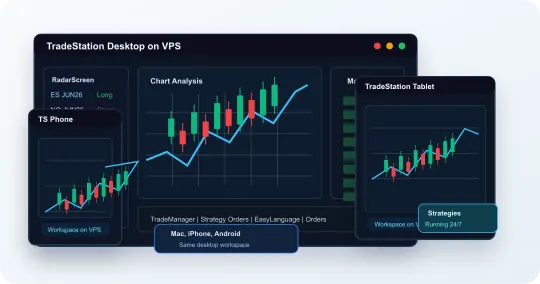
TradeStation Mobile App vs TradeStation VPS
The mobile app is useful for checking charts and managing trades. Our VPS is for traders who need TradeStation Desktop, RadarScreen, Matrix, EasyLanguage strategies, account copying, and low-latency infrastructure to stay online.
Mobile app
Regular TradeStation Mobile App
- Good for checking charts, quotes, positions, and orders from your phone
- Limited when you need desktop RadarScreen, Matrix, OptionStation Pro, or EasyLanguage strategy tools running continuously
- Does not keep desktop workspaces, account copying, strategy windows, and logs running after you leave the app
- Less ideal for multi-platform copier setups and 24/7 strategy hosting
The TradeStation VPS
TradeStation Desktop on VPS
- Runs TradeStation Desktop, RadarScreen, Matrix, EasyLanguage strategies, and account copier software on an always-on server
- Lets you access the same TradeStation workspace from Mac, iPhone, Android, laptop, or desktop
- Keeps strategies, workspaces, account copying, and trading tools online 24/7
- Runs on low-latency VPS infrastructure in NYC, London, and Chicago to help improve fills and reduce slippage
TradeStation Strategies, Workspaces & Account Copying
Use the TradeStation VPS as the always-on Windows desktop where TradeStation, RadarScreen, Matrix, EasyLanguage strategies, TradingView, NinjaTrader, broker dashboards, and account copier software stay connected.
Run TradeStation workspaces, charts, RadarScreen, and Matrix from one persistent Windows session
Keep EasyLanguage strategies and TradeStation tools available 24/7
Copy trading between TradeStation, TradingView, and NinjaTrader is supported when your copier software supports those platforms
Run TradeStation beside broker dashboards and account copier software
Monitor orders, logs, strategies, and copier activity from mobile or desktop
Built for Traders Running TradeStation Desktop, Strategies, and Account Copying
Purpose-built for traders who need TradeStation Desktop, RadarScreen, Matrix, EasyLanguage strategies, NinjaTrader, TradingView, and multi-account copying online 24/7.
TradeStation Desktop Ready
Run TradeStation Desktop on our VPS, then connect from Mac, iPhone, Android, tablet, Chromebook, Linux, or Windows without rebuilding your workspace.
NYC, London & Chicago Low-Latency Trading
Keep TradeStation Desktop, EasyLanguage strategies, workspaces, and account copying running from low-latency VPS locations in NYC, London, and Chicago.
EasyLanguage and Account Copying
Run EasyLanguage strategies, RadarScreen, Matrix, broker dashboards, TradingView, NinjaTrader, and account copier software in one Windows session.
TradeStation VPS Pricing
Choose the Windows trading VPS size that fits your TradeStation workspaces, RadarScreen, Matrix, EasyLanguage strategies, account copying, and automation needs.
Small
Android & iPhone Apps
Or prepay annually
(save 20%):
Recommended for basic TradeStation access from Mac, iPhone, and Android
Windows Server Details:
- 2x AMD Ryzen CPU
- 3.5 GB RAM
- 50 GB NVMe SSD
- Unlimited 200 Mb/s Bandwidth
Recommended
Medium
Android & iPhone Apps
Or prepay annually
(save 20%):
Recommended for TradeStation with RadarScreen, Matrix, charts, and account copying
Windows Server Details:
- 3x AMD Ryzen CPU
- 8 GB RAM
- 100 GB NVMe SSD
- Unlimited 1 Gb/s Bandwidth
High Performance
Android & iPhone Apps
Or prepay annually
(save 20%):
Recommended for multiple workspaces, EasyLanguage strategies, Matrix, RadarScreen, and broker dashboards
Windows Server Details:
- 6x AMD Ryzen CPU
- 16 GB RAM
- 200 GB NVMe SSD
- Unlimited 1 Gb/s Bandwidth
Pro
Dedicated Server
Or prepay annually
(save 20%):
Recommended for high-volume copy trading, multiple platforms, and strategy automation performance
Windows Server Details:
- 16x AMD Ryzen CPU
- 32 GB RAM
- 400 GB NVMe SSD
- Unlimited 1 Gb/s Bandwidth
TradeStation VPS FAQ
Can I use TradeStation Desktop on Mac, iPhone, and Android?
Yes. TradeStation Desktop runs on our Windows trading VPS, and you connect to that same desktop session from Mac, iPhone, Android, tablet, Chromebook, Linux, or Windows.
Which VPS size is best for TradeStation?
The Medium Server works well for most TradeStation users. Choose High Performance or Pro for heavier workspaces, RadarScreen, Matrix, EasyLanguage strategies, account copying, and larger multi-platform trading setups.
Can I run EasyLanguage strategies from my phone?
Yes. EasyLanguage strategies run inside TradeStation Desktop on our Windows VPS, not on your phone. You can monitor and manage the desktop session from mobile while the strategy workspace stays online 24/7.
Can I use RadarScreen, Matrix, and OptionStation Pro?
Yes. You can run TradeStation Desktop tools such as RadarScreen, Matrix, Chart Analysis, TradeManager, and OptionStation Pro on the VPS when those tools are available for your TradeStation account and platform access.
Can TradeStation copy trades with TradingView and NinjaTrader?
Yes. Copy trading between TradeStation, TradingView, and NinjaTrader is supported when your trade copier software supports those platforms.
Why run TradeStation on our VPS instead of locally?
A local computer depends on your home internet, power, distance from brokerage or exchange infrastructure, and whether your device stays online. Our TradeStation VPS keeps TradeStation Desktop, EasyLanguage strategies, workspaces, and account copying running from low-latency VPS locations in NYC, London, and Chicago.
Does this replace the TradeStation mobile app?
No. You can still use the TradeStation mobile app for monitoring and trading, but the VPS gives you access to the desktop platform, RadarScreen, Matrix, EasyLanguage, workspaces, logs, and account copier software from mobile.
How do I download TradeStation Desktop?
TradeStation Desktop downloads are accessed through TradeStation HUB or your TradeStation client login.
Can I use TradeStation Web trading, or do I need the desktop?
TradeStation Web is convenient for quick access, but the desktop platform runs RadarScreen, Matrix, EasyLanguage strategies, and account copier software that the web version does not. Our VPS hosts TradeStation Desktop 24/7, so you get the full workspace from any device.