
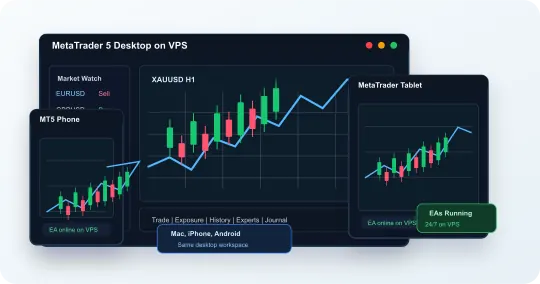
MetaTrader Desktop From Mac, iPhone, and Android
Run MetaTrader 4 or MetaTrader 5 on our Windows VPS, then access the same trading workspace from Mac, iPhone, Android, iPad, Windows, Chromebook, or Linux. Your terminals, Expert Advisors and supported copier software run on the server, so your home computer can be off while you connect from another device. Windows licensing is included, and our support team is available 24/7.
Use desktop MetaTrader from devices that normally only run the mobile app
Host your desktop EAs, indicators, scripts, and terminals independently of your phone
Run multiple broker terminals, account copier software, and dashboards beside MetaTrader
Choose from NYC, London, and Chicago server locations for your trading workspace
MetaTrader Mobile App vs MetaTrader VPS
The mobile app is useful for checking charts and managing trades. Our VPS is for traders who need desktop MetaTrader, Expert Advisors, account copying, multiple broker terminals, and low-latency infrastructure to stay online.
Mobile app
Regular MetaTrader Mobile App
- Good for checking charts, quotes, positions, and orders from your phone
- Limited when you need desktop Expert Advisors, scripts, or custom indicators running continuously
- Does not keep multiple broker terminals, account copying, logs, and automation running after you leave the app
- Less ideal for multi-account copier setups and 24/7 strategy hosting
The MetaTrader VPS
MetaTrader Desktop on VPS
- Runs MetaTrader 4/5, broker terminals, Expert Advisors, and account copier software on an always-on server
- Lets you access the same MetaTrader workspace from Mac, iPhone, Android, laptop, or desktop
- Hosts your desktop EAs, supported copier software, and trading tools on the server
- Offers NYC, London, and Chicago locations, included Windows licensing, and 24/7 support
MetaTrader Expert Advisors, Signals & Account Copying
Bring the Windows components of your trading setup together on NMT. Open the actual MT4/MT5 terminals, EA settings, broker dashboards and copier controls from the same remote desktop. For copying between platforms, use software that explicitly supports your sender and receiver platforms.
Keep your configured desktop EAs and custom indicators on the hosted Windows workspace
Keep multiple MT4 and MT5 terminals online for different brokers or accounts
Copy trades between MetaTrader accounts when supported by your account copier software
Use your copier vendor's supported platform connections, licenses, and account permissions
Monitor logs, terminals, broker dashboards, and account copying from one Windows session
Choose Capacity for Your MetaTrader Workspace
Choose your NMT plan around the terminals, charts, EAs and copier processes that run together. A second broker terminal adds a separate application; adding an account to a list does not describe its resource needs.
One Terminal and an EA
Start by evaluating Medium: 8 GB RAM and 100 GB NVMe storage. Include the charts, history, indicators and EA you intend to use. Small remains available for basic desktop access; an EA workload deserves its own capacity check.
Multiple Terminals and a Copier
High Performance provides 16 GB RAM and 200 GB NVMe storage. Evaluate it for a larger group of broker terminals, heavier EAs and companion applications. Count each required sender and receiver installation, and keep the copier's supported account mapping clear.
A Larger Dedicated Workspace
Pro provides a dedicated server with 32 GB RAM and 400 GB NVMe storage. Consider it when your measured workload calls for more resources or dedicated infrastructure. Plan capacity follows your software's demands, not a universal terminals-per-plan promise.
In a broker-supported demo setup, open your intended terminals and tools together. After loading, check CPU use, memory and free storage inside Windows during representative activity. Record the configuration and readings using our MetaTrader VPS sizing worksheet. Keep strategy optimization separate from the workload check unless you intend to run both together.
Need to identify which copier components belong on the server? Our multi-account copier guide maps the sender, receivers and their connections.
See the EA and Copier Behind Your Mobile View
NMT remote access opens your hosted Windows desktop. That gives you the terminal's own EA controls, logs and copier windows on your phone, alongside your charts. The software runs on the VPS; your phone displays and controls it.
Our MT4/MT5 setup guide covers separate terminal folders, EA permissions and copier configuration.
- Confirm the terminal and account. Use clearly labeled shortcuts for each broker and purpose. Check the account and server inside the terminal before changing anything.
- Inspect the running tools. Check the platform's automation control and the EA's own permission. Review recent Experts and Journal entries, then verify the copier's selected sender, receivers and current state.
- Practice switching devices. In a demo setup, disconnect the remote viewer and reconnect from a backup phone, tablet or computer to the same Windows login. Confirm the expected terminals and account state. A normal disconnect leaves the session running; Windows sign-out, a restart or configured session limits can end it.
MetaTrader VPS Pricing
Choose the Windows trading VPS size that fits your MetaTrader terminals, Expert Advisors, indicators, broker platforms, account copying, and automation needs.
Small
Android & iPhone Apps
Or prepay annually
(save 20%):
Recommended for basic MetaTrader access from Mac, iPhone, and Android
Windows Server Details:
- 2x AMD Ryzen CPU
- 3.5 GB RAM
- 50 GB NVMe SSD
- Unlimited 200 Mb/s Bandwidth
Recommended
Medium
Android & iPhone Apps
Or prepay annually
(save 20%):
Recommended for MetaTrader with Expert Advisors, indicators, and account copying
Windows Server Details:
- 3x AMD Ryzen CPU
- 8 GB RAM
- 100 GB NVMe SSD
- Unlimited 1 Gb/s Bandwidth
High Performance
Android & iPhone Apps
Or prepay annually
(save 20%):
Recommended for multiple MT4/MT5 terminals, heavier EAs, and broker dashboards
Windows Server Details:
- 6x AMD Ryzen CPU
- 16 GB RAM
- 200 GB NVMe SSD
- Unlimited 1 Gb/s Bandwidth
Pro
Dedicated Server
Or prepay annually
(save 20%):
Recommended for high-volume account copying, multiple terminals, and automation performance
Windows Server Details:
- 16x AMD Ryzen CPU
- 32 GB RAM
- 400 GB NVMe SSD
- Unlimited 1 Gb/s Bandwidth
MetaTrader VPS FAQ
Can I use MetaTrader on Mac, iPhone, and Android?
Yes. MetaTrader Desktop runs on our Windows trading VPS, and you connect to that same desktop session from Mac, iPhone, Android, tablet, Chromebook, Linux, or Windows.
Which VPS size is best for MetaTrader?
Evaluate Medium for an EA and copier workspace, High Performance for more demanding simultaneous terminals, and Pro for a larger dedicated server. Choose using your actual CPU, memory and storage needs; terminal count alone does not determine capacity.
Can I run MetaTrader Expert Advisors from my phone?
Yes. The EA runs inside the desktop terminal on our Windows VPS. Your phone opens that same Windows session so you can inspect its settings, permissions and logs. Keep the terminal, broker connection and required EA permissions active.
Can I run multiple MetaTrader terminals?
Yes. Use separate terminal installation folders for simultaneous accounts, label each instance clearly, and size the VPS for the combined terminals, charts, EAs and copier workload.
Can I check my EA and copier from a backup device?
Yes. Connect to the same NMT Windows workspace from another supported device, then inspect the terminal account, automation permissions, logs and copier state. You do not need to reinstall the EA on the device you use to connect.
Can MetaTrader copy trades to NinjaTrader or other platforms?
Yes. Our VPS gives you one persistent Windows desktop where MetaTrader, NinjaTrader, broker platforms, and account copier software can stay open together for platform-to-platform trade copying when supported by your tools.
Why run MetaTrader on our VPS instead of locally?
NMT hosts your desktop terminals and supported trading tools independently of your home computer. You get the same Windows workspace across supported devices, included Windows licensing, 24/7 support and a choice of NYC, London or Chicago locations.
Does this replace the MetaTrader mobile app?
No. You can still use the MetaTrader mobile app for monitoring, but the VPS gives you access to the desktop terminal, Expert Advisors, scripts, custom indicators, logs, and account copier software from mobile.