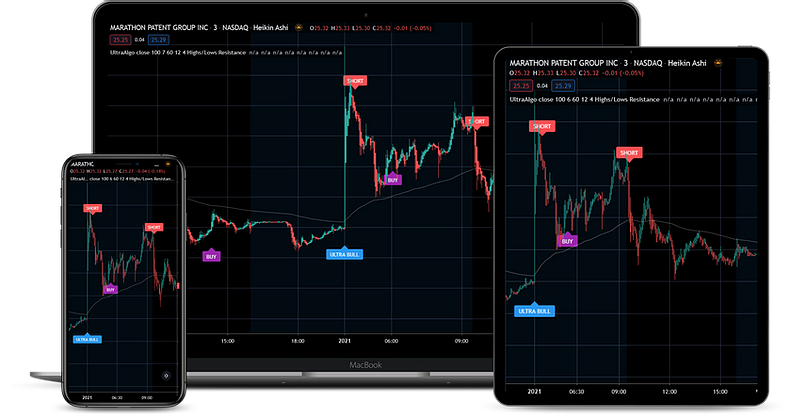
Use NinjaTrader Desktop on your Mac by connecting to the Windows workspace we host for you. Ninja Mobile Trader VPS specializes in hosting NinjaTrader Desktop: your charts and Windows add-ons run on the server, while your Mac displays and controls them. Our subscriptions include a Windows Server license and 24/7 support, and you can return to the same workspace from supported mobile devices.
For a Mac trader who needs Desktop indicators or NinjaScript tools without maintaining a local Windows virtual machine, that keeps the Windows workload in one place. Install each add-on on the VPS according to its vendor’s compatibility and licensing instructions.
Compare the Mac setups#
| Approach | Where the desktop runs | Practical difference |
|---|---|---|
| Our Windows VPS | Hosted Windows server | Your Mac accesses the workspace; the Windows workload does not depend on the Mac staying awake |
| Parallels | Windows virtual machine on your Mac | macOS and Windows share the Mac’s resources; chip architecture and add-on compatibility need checking |
| Your own remote Windows PC | A computer you maintain | You manage its power, sleep settings and network availability |
| NinjaTrader web | Browser-based platform | Desktop NinjaScript add-ons do not automatically become web tools |
Connect your Mac to our Windows VPS#
NinjaTrader and its Windows add-ons are installed inside the remote desktop. The Mac runs the remote-access client, so its processor does not determine the Windows server’s architecture.
Microsoft’s Windows App instructions for macOS describe the connection:
- Install Windows App from the Mac App Store and open it.
- On Devices, select + > Add PC.
- Enter the server hostname or IP address in PC Name. Add a friendly name so you can recognize this workspace.
- Select Add, then double-click the saved PC. Enter the Windows username and password supplied with your VPS, not your NinjaTrader login.
- Once the Windows desktop opens, install or open NinjaTrader there and verify the intended workspace and account in simulation.
For a direct remote-PC connection, Microsoft says you do not need to sign in to Windows App itself. You still need valid Windows credentials. Confirm unexpected server-identity warnings with our support team.
Use the NinjaTrader VPS sizing guide for resource choices and the Windows VPS setup guide for initial installation.
Example: move a NinjaScript indicator from your Mac to the VPS#
Suppose you downloaded an indicator on your Mac and want it in the NinjaTrader workspace on your VPS. A file in the Mac’s Downloads folder is still on the Mac; it has not been installed in remote Windows.
The shortest route: open a browser inside your VPS and download the indicator from its vendor’s official source. Save it in Windows, then follow the import step below. This avoids transferring a local file.
If the vendor’s NinjaScript archive (.zip) is already on your Mac, use a dedicated transfer folder:
- Put the ZIP in a Mac folder containing only the file you want to share.
- In Windows App’s Devices view, open your saved PC’s … > Edit menu.
- Under Folders, enable Redirect folders, select +, choose the transfer folder, then Open. You can mark it Read-only; select Save.
- Connect again to that saved PC. In remote Windows File Explorer, find the redirected folder as a network drive and copy the ZIP into a local folder on the VPS, such as Downloads.
- Inside the VPS’s NinjaTrader Control Center, choose Tools > Import > NinjaScript Add-On…, select the copied ZIP and import it. Follow any vendor-specific installation and activation instructions.
Microsoft documents the Mac folder-sharing controls, including policies that can hide the Folders tab. If it is unavailable, use the browser inside your VPS to download the file. NinjaTrader’s add-on installation guide explains the import menu; use trusted vendor packages and their instructions for other formats, such as an EXE installer.
To finish the example, confirm that the indicator appears in NinjaTrader, complete its vendor activation and load it on a simulation chart before using it live. The copied file and installed indicator now reside on the VPS; the redirected Mac folder is only a transfer route. Reconnecting from another supported device opens that hosted installation—there is no need to install the Windows indicator on the phone.
Parallels: check Intel versus Apple silicon first#
Open Apple menu > About This Mac to identify the chip or processor. Parallels’ system requirements, checked October 5, 2026, distinguish these setups:
- Apple silicon: the standard Windows installation uses Windows 11 on Arm. Parallels Desktop 27 supports Apple silicon Macs.
- Intel Mac: Intel support continues in Parallels Desktop 26, with a different guest operating-system list.
Parallels documents Windows-on-Arm application limitations. Verify the exact NinjaTrader release, broker components, indicators and copier tools you need; successfully installing Windows does not confirm every add-on works.
Start with NinjaTrader’s Windows requirements. A local virtual machine needs resources for both macOS and Windows and relies on the Mac remaining available. With our VPS, the Windows installation and its workload stay on the server.
Using an existing Windows PC or web access#
An existing Windows PC can also host NinjaTrader while your Mac controls it remotely. Microsoft explains the supported editions and connection requirements in its remote-PC FAQ. You remain responsible for that PC staying awake, powered and connected.
NinjaTrader distinguishes C# Desktop indicators from JavaScript web indicators. If your workflow depends on a Desktop indicator or copier, browser access alone should not be assumed to run it. Our hosted Windows workspace keeps those Desktop tools together.
What happens when you close the Mac?#
Closing the Mac does not itself shut down the remote VPS. Disconnecting remote access and signing out of Windows are different actions: sign-out closes the Windows user session. Restarts and configured session limits can also interrupt applications. For access from a second device, use the NinjaTrader mobile desktop guide.
For disconnected NinjaTrader data feeds, we recommend Ninja Watchdog. It automatically reconnects supported accounts, including Rithmic and Tradovate, and waits for live data before restoring interrupted strategies. Install it on the VPS running NinjaTrader; recovery still depends on the provider connection becoming available.
Ready to keep your NinjaTrader Desktop workspace off your Mac and accessible across devices? Choose your Ninja Mobile Trader VPS plan.