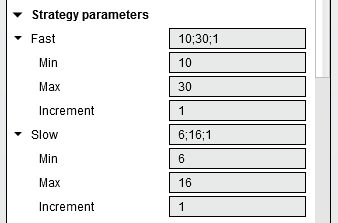
Choose Optimization in Strategy Analyzer, define small parameter ranges, select a fitness measure and run the search. Do this inside your Ninja Mobile Trader VPS, where we host NinjaTrader Desktop on Windows. Your research installation stays together across supported devices, with Windows licensing included and 24/7 VPS support.
Fix the historical baseline first#
Optimization repeats historical tests with different inputs. Begin with a strategy that already completes a defined backtest. Our Strategy Analyzer guide covers that prerequisite; our Strategy Builder guide covers creating the script.
Keep the strategy version, instrument, dates, bar settings, trading hours, commission and fill assumptions fixed. NinjaTrader’s backtest settings define those controls. Confirm the necessary historical data is available in the hosted installation before comparing results.
Write down the research question before choosing a metric. Changing the data, code and parameters together makes it harder to explain which change produced a different result.
Set the search bounds#
In the Settings panel:
- Set Backtest type to Optimization.
- Expand the intended strategy inputs and set Min, Max and Increment.
- Choose the ranking criterion under Optimize on and the search method under Optimizer.
- Set Keep best # results for the leading results to retain. Leave Optimize Data Series off for this fixed-bar exercise, then select Run.
The official optimization guide documents these controls. The illustration above shows example fields, not recommended trading settings.
Count combinations before starting#
For two illustrative integer inputs:
| Input | Min / Max / Increment | Values tested |
|---|---|---|
| A | 10 / 14 / 2 | 10, 12, 14 |
| B | 20 / 24 / 2 | 20, 22, 24 |
A Default search has 3 × 3 = 9 combinations here. Adding another input with five values would make 45. These counts are arithmetic examples, not measured runtimes or recommended strategy values.
A short date range does not prevent a large parameter search. Start with only the inputs relevant to your question.
Choose Default or Genetic deliberately#
NinjaTrader’s Genetic Algorithm reference distinguishes the methods: Default tests every combination; Genetic searches a subset using successive generations.
A small Default search is easier to enumerate. Genetic can explore larger spaces, but its approximate solution is not guaranteed to be the absolute optimum. Record the method and any Genetic settings when comparing runs.
The selected fitness defines what “best” means for this search. Decide what that measure answers before sorting results; the highest row is not automatically the configuration you should trade.
Inspect and save a selected result#
The results’ Performance value follows the selected fitness; Parameters identifies the inputs. Keep best # results limits retained results, not the number of combinations searched.
After selecting a result, use template > Save with a descriptive research name. NinjaTrader’s parameter-template reference explains that the selected optimization result is saved; its number appears in parentheses in the parameter control.
Keep the baseline and selection rationale alongside that configuration. Validate it on data not used to select it and in a supported simulation workflow before considering live use. NinjaTrader documents differences between historical and real-time results; optimization does not remove them.
Keep research capacity separate from active execution#
NinjaTrader uses available CPU cores for optimization. Avoid competing optimization jobs or running the search while managing trades. Reduce retained results if memory is constrained.
NMT’s Pro Dedicated Server is offered for CPU-intensive algorithms and strategy optimizations. Compare your complete workload with our NinjaTrader sizing guide, and use a planned research window or separate research server when needed. The VPS performs the calculation; your phone or laptop displays the workspace.
Keep your NinjaTrader research workspace on NMT
Choose a Windows VPS or dedicated server for the workload you plan to run.